🌍 Building a Real-Time Global Traffic Visualization System
In this post, I’ll walk you through how I built a real-time traffic visualization system that displays live user interactions across the globe. We'll cover the backend setup with Laravel and Redis, and the frontend implementation using Vue.js, MapLibre GL, and Deck.gl.
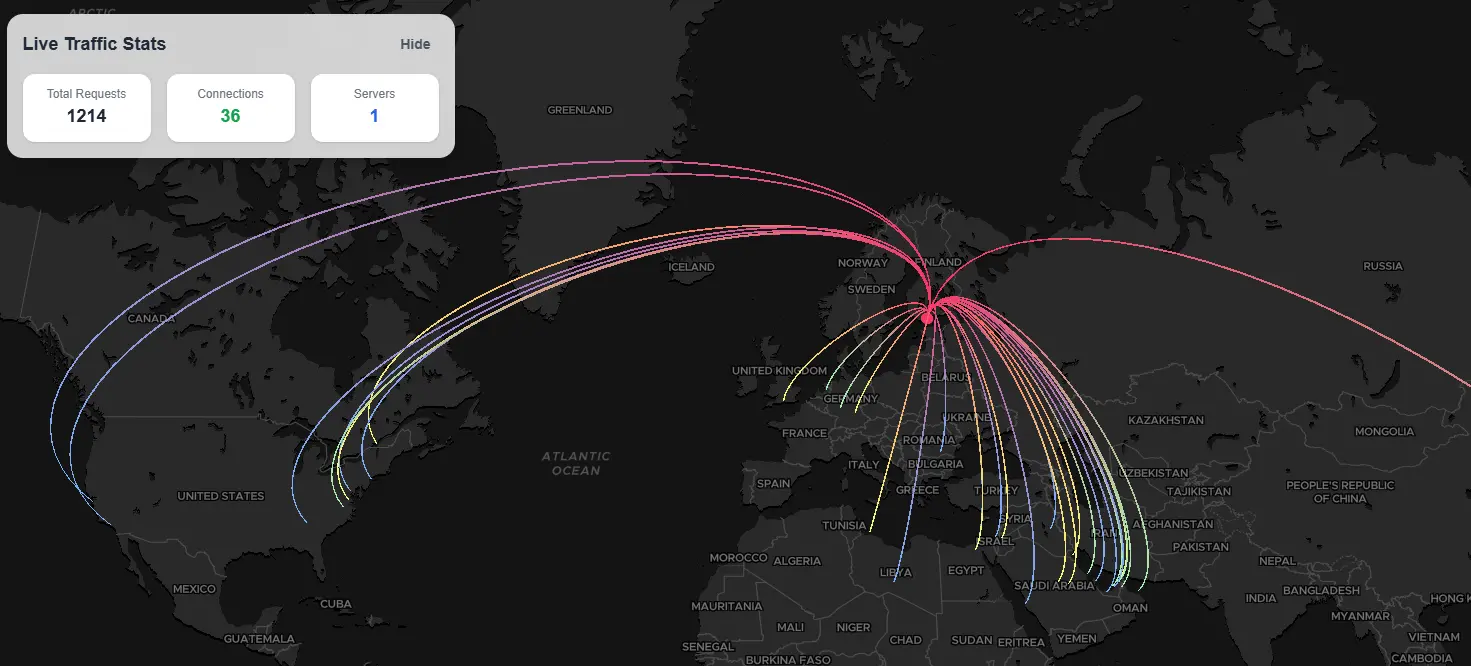
Demo of the Interactive traffic map we will be building
1. 🚀 Introduction: The Vision and Tools
The goal was to create a system that captures and visualizes real-time traffic data from my applications worldwide. Each user interaction would be represented as a connection between the client and server locations on a global map.
Technologies Used:
- Backend:
- Laravel (PHP framework)
- Redis (for caching and atomic locks)
- Pusher or Laravel Echo (for real-time broadcasting)
- Frontend:
- Vue.js (JavaScript framework)
- MapLibre GL JS (for map rendering)
- Deck.gl (for high-performance data visualization)
2. 🧠 Handling High Traffic with Cache Locks and Batching
Understanding Race Conditions
In high-traffic scenarios, multiple processes might attempt to access or modify shared resources simultaneously, leading to race conditions. This can result in inconsistent data or system crashes.
Implementing Atomic Locks with Redis
To prevent race conditions, I utilized Laravel's "Cache::lock()" method, which provides atomic locks using Redis. This ensures that only one process can execute a critical section of code at a time.
Cache::lock('traffic_batch_lock', 10)->block(5, function () {
    // Critical section code
});
In this example, the lock named "traffic_batch_lock" is acquired for 10 seconds. If the lock is already held, the process will wait up to 5 seconds to acquire it.
Batching Events to Optimize Performance
Instead of broadcasting each traffic event individually, I implemented a batching mechanism. This collects multiple traffic events and broadcasts them together, reducing the load on the broadcasting system.
Middleware Implementation:
public function handle(Request $request, Closure $next): Response
{
    if (!app()->runningInConsole()) {
        $this->batchingService->queueEvent();
        $this->batchingService->processBatch();
    }

    return $next($request);
}
In this middleware, each incoming request queues its traffic data, and the "processBatch" method handles broadcasting the batched events.
Event Batching Service Implementation:
// app/services/EventBatchingService.php
<?php

namespace App\Services;

use App\Events\ApplicationTrafficBatchEvent;
use App\Events\ApplicationTrafficRecorderEvent;
use Illuminate\Support\Facades\Cache;
use Illuminate\Support\Facades\Log;

class EventBatchingService
{
    /** @var string  The cache key used to store queued events */
    protected const CACHE_KEY = 'application_traffic_events';

    /** @var string The cache key used to store the last event emit time */
    protected const LAST_EMIT_KEY = 'application_traffic_last_emit';

    /** @var string The Atomic Lock key for queue cache handling */
    protected const QUEUE_LOCK_KEY = 'application_traffic_lock';

    /** @var int The minimum time (in seconds) between event emissions */
    protected const THROTTLE_SECONDS = 2;

    /** @var int The maximum number of events to include in a single batch
     * This can be adjusted based on Pusher's message size limits */
    protected const MAX_BATCH_SIZE = 10;

    /**
     * Queue an event to be processed in the next batch
     */
    public function queueEvent(): void
    {
        try {
            // Create the event data
            $event = new ApplicationTrafficRecorderEvent();
            $eventData = $event->trafficData;

            // Use a lock to prevent race conditions when multiple processes update the queue
            Cache::lock(self::QUEUE_LOCK_KEY, 10)->get(function () use ($eventData) {
                // Get current queued events
                $queuedEvents = Cache::get(self::CACHE_KEY, []);


                // Add new event to the queue
                $queuedEvents[] = $eventData;

                // If we've reached the maximum batch size, trim the oldest events
                if (count($queuedEvents) > self::MAX_BATCH_SIZE) {
                    $queuedEvents = array_slice($queuedEvents, -self::MAX_BATCH_SIZE);
                }

                // Store updated queue back in cache
                Cache::put(self::CACHE_KEY, $queuedEvents, now()->addMinutes(10));
            });
        } catch (\Exception $e) {
            Log::error('Failed to queue application traffic event: ' . $e->getMessage());
        }
    }

    /**
     * Process and broadcast all queued events
     */
    public function processBatch(): void
    {
        try {
            // Use a lock to prevent race conditions when multiple processes process the batch
            Cache::lock(self::QUEUE_LOCK_KEY, 10)->get(function () {
                // Check if enough time has passed since the last emit
                $lastEmitTime = Cache::get(self::LAST_EMIT_KEY);
                $now = now();

                if ($lastEmitTime && abs($now->diffInSeconds($lastEmitTime)) < self::THROTTLE_SECONDS) {
                    // Not enough time has passed, skip this batch
                    return;
                }

                // Get all queued events
                $queuedEvents = Cache::get(self::CACHE_KEY, []);

                // If there are no events, do nothing
                if (empty($queuedEvents)) {
                    return;
                }

                // Create a batch event with all queued events
                $batchEvent = new ApplicationTrafficBatchEvent($queuedEvents);

                // Broadcast the batch event
                event($batchEvent);

                // Update the last emit time
                Cache::put(self::LAST_EMIT_KEY, $now, now()->addHours(1));

                // Clear the queue
                Cache::forget(self::CACHE_KEY);
            });
        } catch (\Exception $e) {
            Log::error('Failed to process application traffic event batch: ' . $e->getMessage());
        }
    }
}
Events Implementation:
// app/events/ApplicationTrafficRecorderEvent.php
<?php

namespace App\Events;

use App\Services\IpApiService;
use Illuminate\Broadcasting\Channel;
use Illuminate\Broadcasting\InteractsWithSockets;
use Illuminate\Foundation\Events\Dispatchable;
use Illuminate\Queue\SerializesModels;
use Illuminate\Contracts\Broadcasting\ShouldBroadcastNow;

class ApplicationTrafficRecorderEvent implements ShouldBroadcastNow
{
    use Dispatchable;
    use InteractsWithSockets;
    use SerializesModels;

    public $trafficData;

    /**
     * Create a new event instance.
     */
    public function __construct()
    {
        $ipApi = new IpApiService();

        if (app()->environment('local')) {
            // handle running on local testing env.
            $serverIp = '156.202.149.252'; //EG
            $clientIp = '1.178.4.100'; //US
        } else {
            $serverIp = $_SERVER['SERVER_ADDR'] ?? request()->server('SERVER_ADDR') ?? gethostbyname(gethostname());
            $clientIp = $ipApi->getRealIpAddr();
        }

        // Use any IP location service to convert from IP address to location
        $this->trafficData = [
            'server_ip' => substr(md5($serverIp), 0, 5),
            'server' => array_values($ipApi->getLocationCodeByIp($serverIp)),
            'client' => array_values($ipApi->getLocationCodeByIp($clientIp)),
        ];
    }

    /**
     * Get the channels the event should broadcast on.
     *
     * @return array<int, Channel>
     */
    public function broadcastOn(): array
    {
        return [
            new Channel('application-traffic'),
        ];
    }
}
// app/events/ApplicationTrafficBatchEvent.php
<?php
namespace App\Events;
use Illuminate\Broadcasting\Channel;
use Illuminate\Broadcasting\InteractsWithSockets;
use Illuminate\Foundation\Events\Dispatchable;
use Illuminate\Queue\SerializesModels;
use Illuminate\Contracts\Broadcasting\ShouldBroadcastNow;
class ApplicationTrafficBatchEvent implements ShouldBroadcastNow
{
use Dispatchable;
use InteractsWithSockets;
use SerializesModels;
/**
* Array of traffic data from multiple events
*/
public $trafficDataBatch;
/**
* Create a new event instance.
*
* @param array $trafficDataBatch Array of traffic data from multiple events
*/
public function __construct(array $trafficDataBatch)
{
$this->trafficDataBatch = $trafficDataBatch;
}
/**
* Get the channels the event should broadcast on.
*
* @return array<int, Channel>
*/
public function broadcastOn(): array
{
return [
new Channel('application-traffic'),
];
}
}3. 🗺️ Frontend Visualization with MapLibre GL and Deck.gl
To bring the traffic data to life, I used Vue 3, MapLibre GL JS for rendering the interactive map, and deck.gl (via @deck.gl/mapbox) to overlay animated arcs and points representing real-time traffic events.
Technologies Used
- Vue 3 (Composition API) — for component logic and reactivity
- MapLibre GL — open-source alternative to Mapbox GL JS, used to render the basemap
- deck.gl — to render high-performance WebGL layers (e.g., animated arcs, scatterplots)
- Laravel Echo + WebSockets — to receive batched traffic events in real time
Real-time Traffic Map Component
Below is the full Vue component that powers the real-time visualization. It:
- Initializes a MapLibre map centered on a global view
- Adds a deck.gl overlay to animate traffic arcs between clients and servers
- Listens to real-time traffic events via WebSocket (Echo)
- Batches incoming traffic data for optimized rendering
- Tracks unique server locations (as red points)
- Animates color transitions for ongoing traffic connections
// TrafficMap.vue
<script setup>
import {onMounted, ref, watch, onBeforeUnmount} from 'vue'
import maplibregl from 'maplibre-gl'
import {MapboxOverlay as DeckOverlay} from '@deck.gl/mapbox';
import {ArcLayer, ScatterplotLayer} from '@deck.gl/layers';

// Set up refs
const mapContainer = ref(null)
let map = null
let deckOverlay = null
let trafficBuffer = ref([]);

// Active traffic data that will be displayed
const activeTrafficData = ref([])

// Store unique server locations (will be displayed as blue points)
const serverLocations = ref([])

const colors = [
    [120, 176, 250],
    [163, 240, 173],
    [246, 250, 120]
];

// Function to add a server location to the serverLocations array
// Only adds if the server_ip doesn't already exist in the array
const addServerLocation = (serverIp, location) => {
    // Check if this server IP already exists in our array
    const exists = serverLocations.value.some(server => server.server_ip === serverIp)
    if (!exists) {
        serverLocations.value.push({
            server_ip: serverIp,
            location: location,
            id: `server-${serverIp}`
        })
    }

    TrafficStatsStore.servers = serverLocations.value.length
}

// Function to simulate traffic coming in
const simulateTraffic = (trafficDataBatch) => {
    // Add a new random traffic data point
    if(Array.isArray(trafficDataBatch) && trafficDataBatch.length){

        trafficDataBatch.forEach((item) => {

            TrafficStatsStore.requests += 1;

            const existingIndex = activeTrafficData.value.findIndex(
                (data) => Array.isArray(data.client) &&
                    data.client[0] === item.client?.[0] &&
                    data.client[1] === item.client?.[1] &&
                    data.server_ip === item.server_ip
            )

            if (existingIndex !== -1) {
                let colorIdx = activeTrafficData.value[existingIndex].colorIdx;

                if (colorIdx + 1 > colors.length - 1) {
                    activeTrafficData.value[existingIndex].colorIdx = 0;
                } else {
                    activeTrafficData.value[existingIndex].colorIdx += 1;
                }

            }else{
                activeTrafficData.value.push({
                    ...item,
                    colorIdx: 0,
                    shouldChangeColor: true,
                    id: Date.now(),
                })
            }

            // Add server location to our server locations array
            addServerLocation(item.server_ip, item.server)
        })

        TrafficStatsStore.connections = activeTrafficData.value.length;

        // Update the deck overlay with new data
        if (deckOverlay) {
            updateDeckOverlay()
        }
    }
}

//Function to update the deck overlay with new data
const updateDeckOverlay = () => {
    if (!deckOverlay) return;

    deckOverlay.setProps({
        layers: [
            // Animated arcs for traffic
            new ArcLayer({
                id: `traffic-arc${Date.now()}`, // Unique ID to force update
                data: activeTrafficData.value,
                getSourcePosition: d => d.client,
                getTargetPosition: d => d.server,
                getSourceColor: d => colors[d.colorIdx],
                getTargetColor: d => [248, 55, 104],
                getWidth: d => {
                    return 1.5;
                },
            }),
            // Blue points for server locations
            new ScatterplotLayer({
                id: `server-locations${Date.now()}`,
                data: serverLocations.value,
                getPosition: d => d.location,
                getRadius: 8,
                radiusMinPixels: 6,
                pickable: true,
                stroked: true,
                lineWidthMinPixels: 1,
                lineWidthScale: 1,
                getFillColor: [248, 55, 104], //  Servers Color
                getLineColor: [248, 55, 104], //  Servers Color
            })
        ]
    });
};

onMounted(() => {
    // Initialize the map
    map = new maplibregl.Map({
        container: mapContainer.value,
        style: 'https://api.maptiler.com/maps/dataviz-dark/style.json?key=<ADD API TOKEN HERE>',
        center: [0.45, 14.47],
        zoom: 2,
        pitch: 20,
        bearing: 0,
    });

    // Initialize deck.gl overlay with empty data
    deckOverlay = new DeckOverlay({
        interleaved: true,
        layers: []
    });

    // Set up map controls
    map.on('load', () => {
        map.addControl(deckOverlay);
        map.addControl(new maplibregl.NavigationControl());

        const ele = document.getElementsByClassName('maplibregl-control-container')
        while (ele.length > 0) {
            ele[0].parentNode.removeChild(ele[0]);
        }

    });

    Echo.channel(`application-traffic`)
        .listen('ApplicationTrafficBatchEvent', (e) => {
            if (e?.trafficDataBatch && Array.isArray(trafficBuffer.value)) {
                trafficBuffer.value.push(...e.trafficDataBatch);
            }
        });

    setInterval(() => {
        if (Array.isArray(trafficBuffer.value) && trafficBuffer.value.length > 0) {
            const batch = [...trafficBuffer.value];
            trafficBuffer.value = [];

            simulateTraffic(batch); // draw batched data
        }
    }, 2000); // tune this interval based on performance

});

// Clean up resources when component is unmounted
onBeforeUnmount(() => {

    // Remove the map
    if (map) {
        map.remove();
    }
});


</script>

<template>
    <div class="traffic-map-container">
        <div ref="mapContainer" class="map-container"></div>
    </div>
</template>

<style scoped>
.traffic-map-container {
    position: relative;
    width: 100%;
    height: 100vh;
}

.map-container {
    height: 100%;
    width: 100%;
}

</style>
Live Animation Example
In action, each client-server connection is visualized as a smooth arc across the globe. Repeated traffic to the same server is color-cycled for better visual differentiation. Server nodes are rendered as persistent red points.
This system scales well with thousands of connections, thanks to the batching mechanism and GPU-accelerated rendering from deck.gl.
Tip: Adjust the update interval and color cycling strategy based on the volume and frequency of traffic data for optimal UX and performance.
4. 📦 Resources
You can find the complete frontend code in the TrafficMap folder of my Website GitHub repository.
The frontend code is organized in the following structure:
- TrafficMap.vue: Main Vue component that initializes the map and handles real-time updates.
- TrafficStatsStore.js / TrafficStatsPanel.vue: Handles the traffic stats.
5. 🧠 Conclusion
By combining Laravel's backend capabilities with Redis for caching and atomic locks, and leveraging Vue.js with MapLibre GL and Deck.gl on the frontend, I built a robust and high-performance real-time traffic visualization system. This setup efficiently handles high traffic volumes and provides an interactive and informative visualization of global user interactions.
Feel free to explore the code and adapt it to your own projects!